


Komposition aus mehreren Geräten. Computer, Smartwatches, Laptops, Tablets und Smartphones stehen nebeneinander. Alle zeigen Vaira in Aktion. Die Smartwatch zeigt lediglich Benachrichtigungen von Vaira.

Your digital toolbox!

With Vaira, you are setting up your business for the future. Realize your full potential now.

Surveying

made

easy

Super fast and child’s play: Vaira is your surveying tool for quality-assured digital dimensioning sketches. Run through your construction project and place survey points on components and pipes at the touch of a button. You can already see distances and heights during the survey. Multi-section surveys are also possible.

simple handling – no lengthy training courses required

fast results – straight to final sketches

precise values – more accurate than any sagging tape measure

affordable – fair pricing model that saves costs and working time

modern – how to convince the specialists of today and tomorrow

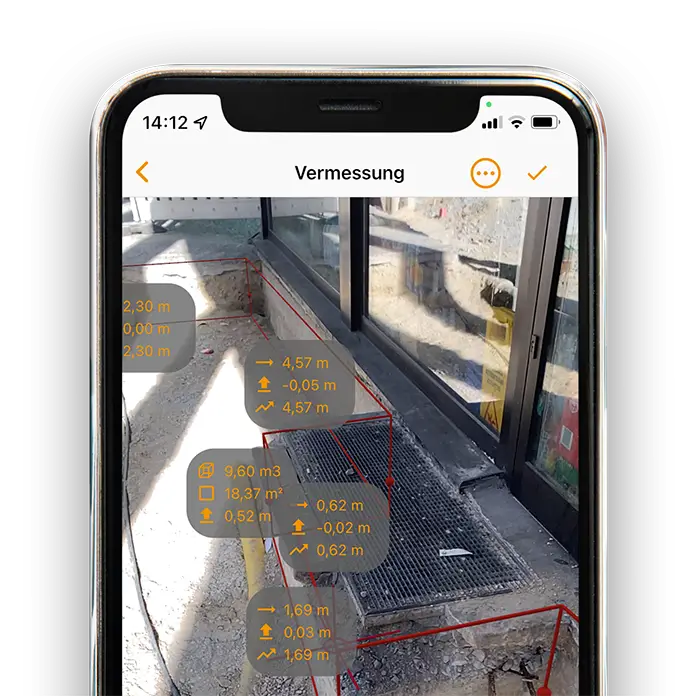
Ein Smartphone, auf dem eine Vermessung mit der Vaira App zu sehen ist. Ein Baugraben wurde hier per Augmented Reality mit einem iPhone vermessen. Es sind Gitterlinien der LiDAR-Lasererkennung über den Oberflächen zu sehen. Außerdem sind die bisherigen Messwerte in der Augmented-Reality-Ansicht sichtbar.

Smartphone surveying with augmented reality

Photogrammetry instead of measuring tape. Vaira automatically calculates, draws and photo-documents for you.

Ausschnitt eines Smartphone, auf dem eine Vermessung mit der Vaira App zu sehen ist. Ein Baugraben an einem Gebäude mit freigelegtem Schacht ist zu sehen. Der Baugraben wurde mit der AR-Funktion vermessen. Es sind mehrere Messwerte inklusive Volumen des Baugrabens in der AR-Ansicht ablesbar.

GPS/GNSS surveying with viDoc®

Measure any size by satellite. The integration of the optional viDoc® hardware into the Vaira software makes it child’s play.

viDoc® über einem GIS-Kartenausschnitt.

Only with Vaira

Surveying with added value

Vaira turns every fitter into a surveyor. Thanks to the Vaira app, the construction project is measured in augmented reality. All values are recorded, legible and accurate.

The intuitive user guidance makes it easy for all employees to carry out quick and precise measurements via smartphone.

Quickly captured by one person

Accurate and child’s play

Automatic photo documentation

Points, distances, areas & volumes

Multi-day measures & construction phase

Points, lines, surfaces and cubatures

Measurements of any kind are possible with Vaira. One-, two- and three-dimensional objects with any number of points represent each of your use cases. This makes Vaira your all-round surveying tool.

DVGW-compliant

With Vaira, you can achieve the accuracy required by the DVGW. You can automatically record even more data for high-quality building documents to further increase safety on German construction sites.

Accuracy

Using augmented reality measurement, you can achieve an accuracy of around ±10 cm with Vaira. This meets regulatory requirements and experience has shown that it is even more accurate than tape measure measurement. Depending on the shading, centimeter accuracy can be achieved using GNSS.

Automatic sketch

Vaira takes all the work out of drawing sketches. You measure using your smartphone, determine the zero and vanishing points with a click and the app does the rest. An orthogonally dimensioned digital sketch in seconds!

Snapping

Don’t want to mess around? Vaira supports your surveys, recognizes points that have already been recorded, and makes it easy to connect new survey objects.

Automatic photo documentation

Photo evidence is the be-all and end-all for sustainable construction documentation. With Vaira, you automatically take a photo of every measured point at the same time. This means that surveys can be reconstructed better than ever before – without any additional effort!

Meta data

Vaira automatically records important metadata for documentation. Cell phone model, software version, timestamp and more – this gives you comprehensive knowledge about your measurement data and tools.

Exports

Create print-ready PDFs from your measurements at the touch of a button – including coordinate points, symbols and orthogonal dimension lines. Data exports in common geodata formats are also possible, as is transfer via an interface.

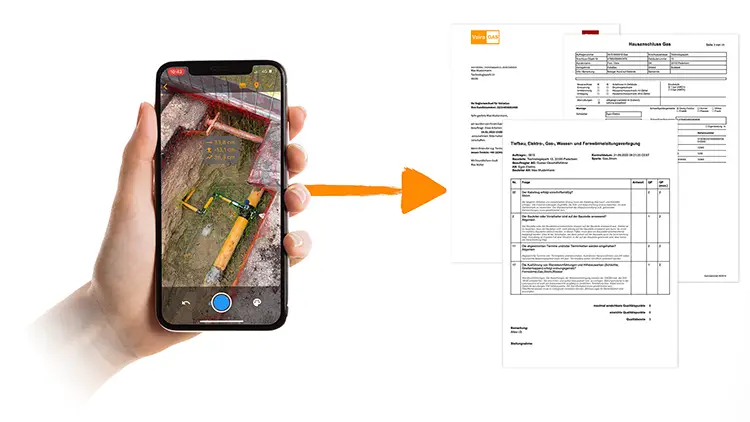
Drei quer übereinander liegende ausgedruckte Exporte aus Vaira. Zu sehen ist die Vermessung eines Gas-Hausanschlusses, einige Dokumentationsdaten und ein ausgedrucktes Beweisfoto zu einer Augmented-Reality-Vermessung.

Offline mode

No mobile network? No problem! All data is available offline with just one click. As soon as you have internet again, Vaira carries out the uploads in the background.

Object formation

Automate the transfer of survey data to your GIS. Use the export functions provided by Vaira to create objects including geodata and metadata in your GIS.

Symbols and texts for your sketches

Manage individual symbols and add them to your components. These can be automatically added to the component position in your dimensioning sketch. You can also insert free texts and export them with all other data for further systems.

Fünf Kacheln, jeweils mit dem Namen des Symbols und darunter das entsprechende Symbol aus dem DVGW-Regelwerk.

Multiline

Whether gas, electricity, (waste) water, district heating, telecommunications, broadband or completely different lines: with Vaira you can also carry out several surveys in one go. Combine several divisions in one process to simplify the work for everyone involved and avoid multiple documentation efforts.

BIM ready

3D Model

Need more than just coordinate data? Get the most out of your smartphone with Vaira. The app uses photogrammetry and laser sensors on the latest smartphones to record complex point clouds. From these, Vaira generates a 3D model of your survey.

As intuitive as AR measurement

Automated parallel to measurement

Can be imported into your CAD software

Can also be used in other 3D software

Future-proof and BIM-ready

Workflows

for all

cases

Make short work of your routines. In Vaira Office, you map your work in an intuitive modular system. Once built, you can create any number of processes from the workflows, massively automating and speeding up your work.

modular system without programming

serial and parallel processes

auto-assignment of specialists

processes can be dynamically optimized

audit-proof

configurable interface IDs

Laptop, auf dem ein Prozess in der Vaira Workflow-Engine zu sehen ist.

First steps

Workflow Designer

Step by step to your routine. Build your process from simple tiles and connect them together. You don’t need any programming skills or knowledge of process modeling languages or symbols.

Fields for your documentation

Forms Designer

Map your forms using fields. Various data and input types make documentation work easier. Features such as mandatory fields ensure data entry security that never existed on paper. Automated calculations and data validation prevent human error and save valuable time.

+ weitere Feldtypen
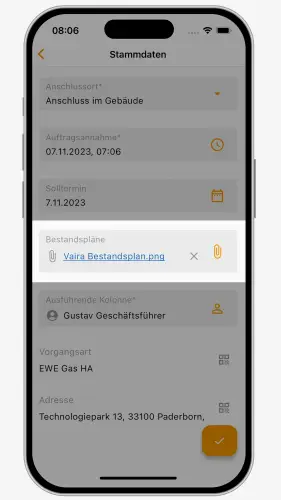
Ein hervorgehobenes Anhangsfeld in der Vaira App.
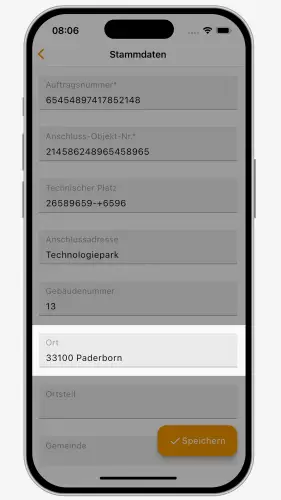
Ein hervorgehobenes Textfeld in der Vaira App.

Scanner for forms

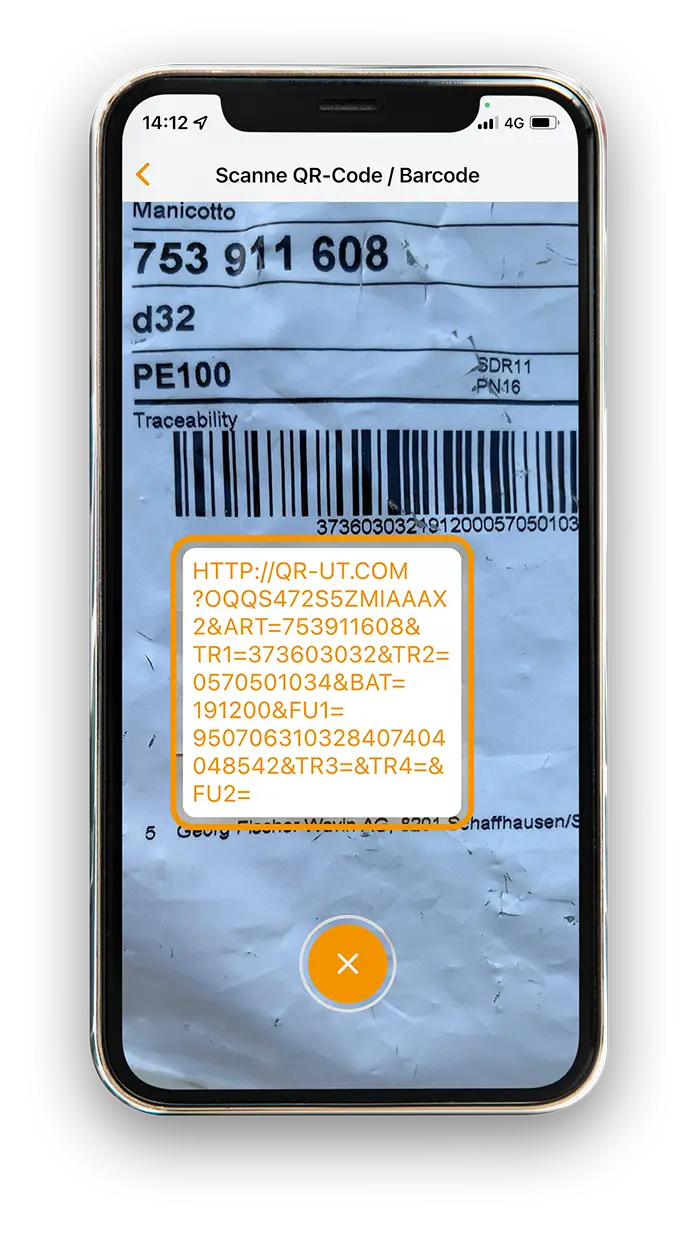
Use Vaira’s QR and barcode scanner to fill in your fields. The Vaira App reads the data from barcodes and QR codes and automatically converts it into text fields. This allows you to enter welding numbers, for example, in seconds.

QR-Code: Vaira kostenlos nutzen.

Scan component codes instead of copying them

Most components already come in bags with all the important information in the form of barcodes or even newer QR codes. With Vaira, you can scan this information and prevent transposed numbers or forgetting numbers.

Smartphone mit aktivierter Kamera in der Vaira App. Die Funktion "Scanne QR-Code / Barcode" ist aktiv und ein QR-Code wird gerade gescannt. Sein Inhalt ist auf dem Smartphone in einem weißen Kasten über dem QR-Code zu sehen.

Quick measurement for fields

It doesn’t always have to be the full program. Do you just want to measure a short distance without starting a full AR or GNSS survey? Thanks to our quick survey, you can also use your smartphone as a quick measuring tape for distances and areas and save the results in text fields.

Reports

How are your orders doing? With just a few clicks, you can export the status report of selected or all processes in a standard table format – modern reporting without any effort.

Drag-&-Drop

Custom tables

Decide for yourself what information should be displayed in your process lists. From simple text information such as address and assigned persons to real-time status reports on process steps. Vaira offers you a comprehensive toolkit to configure tables according to your wishes.

Text recognition for forms

Copy a 15-digit number? Type out a long text? Thanks to text recognition, you no longer have to. Hold the camera to it, confirm and numbers or text are automatically transferred to your fields.

Connect workflows

Processes are often dependent on other processes. Vaira enables you to connect different workflows with each other and thus create seamless transitions and data transfers– without any manual transfer work.

Lists &

directories

Managing component lists and service specifications can be a demanding task. Information on paper in particular tends to become outdated quickly. Vaira takes a lot of the burden off your shoulders.

fully digital maintenance

audit-proof versioning

changes in a matter of seconds

automatic rollout

import of tables and CSVs

optional manufacturer directories

more up-to-date than any paper

search and filter functions

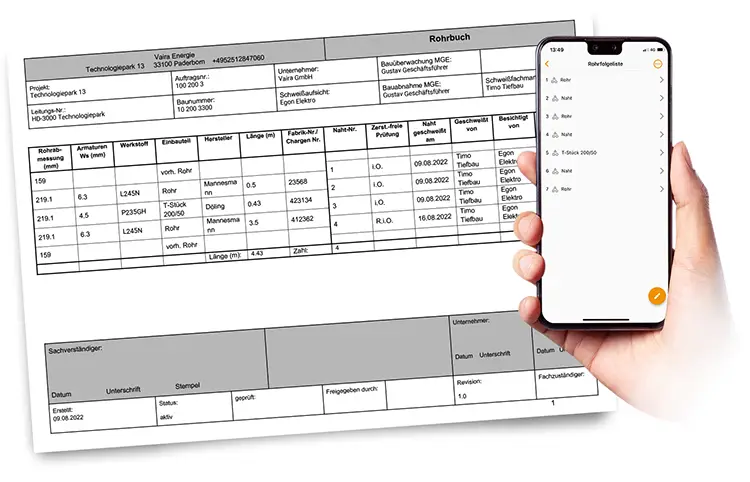
Eine ausgedruckte Rohrfolgeliste neben einem Smartphone, auf dem eine Bauteilliste mit Vaira zu sehen ist.

Central curating

We give you back the overview. With Vaira, you maintain your lists and directories centrally and make this data set available to everyone else. This allows you to avoid countless outdated table files and obsolete paper forms with incorrect values, prices or components.

Revisions

All changes to your directories are saved as a new revision. You always retain access to old revisions. Previous processes remain linked to the old data and thus remain permanently reliable and persistent data sources.

Increase productivity and quality of work

Processes and lists combined

Integrate directories into your workflows and make them available to everyone. Processes automatically refer to the latest version of the respective directory. This means your documentation is always up to date.

central management of your lists

global rollout without effort

processes with current data records

linking surveying and lists

component documentation at the measuring point

processually prefilled data

Vaira auf einem iPhone. Zu sehen das Innere eines digitalen Rohrbuchs, in dem Rohrfolgelisten erstellt, Leitungsnummern dokumentiert und Datumsangaben gemacht werden können. Außerdem sind einige read-only-Felder zu sehen. Sie umfassen die Gesamtlänge und die Anzahl der Nähte, die automatisch von Vaira berechnet wurden.

Imports & Exports

Use your existing tables to easily upload them to Vaira. This allows you to use thousands of entries in Vaira ready for production within seconds.

Search and filter

With comprehensive search and filter options, you can quickly navigate through your lists on your computer and on the go on your smartphone. Search for individual name components to access parts, service items and more.

Exports

Vaira adapts to your requirements – and not the other way around. Comprehensive export options allow you to transfer data to other systems. Vaira even generates print-ready PDFs for you if your client doesn’t want to do without paper for the handover.

export of all documentation data

coordinates as geoJSON file

formats include DXF, SHP, CSV

exports as print-ready PDF

use your own Word templates

Ein Smartphone mit der Vermessung von Vaira. Ein Pfeil führt zu drei ausgedruckten Dokumentationspapieren.

Short and crisp

You upload your export templates to Vaira once. From then on, each export takes just one click. The PDF ends up directly in your Downloads folder and can be used again.

Little code & lots of power

Preparing your documents requires little know-how. Comprehensive instructions in our knowledge base will help you to prepare your templates in the best possible way.

Everything in your custom style

Templates for your PDFs

You can determine the design of your documentation yourself using the powerful export template tool. On request, Vaira transfers all relevant data to your prepared Word document and outputs a printable PDF. This means you can also supply clients who still insist on paper.

your logo and design in the building documentation

full control over data export

printable PDF ready for submission in seconds

Users &

System

Manage construction site and office staff via a powerful administration system. Define groups and bring external companies into your system within a self-defined framework. Enable smooth collaboration across company boundaries – all in a standardized process.

central administration of users

groups for assignments

authorization roles for access

external companies can be integrated

multilingual software

Digitale Prozessabbildung – Zwei Macs, auf deren Bildschirmen die Verwaltung von Nutzern und Rollen mit Vaira zu sehen ist.

Everything at a glance

Control users in your company centrally via a web interface. Activate and deactivate user accounts with just a few clicks. Get an overview of created columns, departments and divisions and assign or remove roles and authorizations.

Roles and rights

Determine the access to your data records from coarse to fine. Assign users individual policies that grant them authorizations, or bundle several into roles. You can assign these to individual users as well as groups or entire organizations.

Overcoming company boundaries

Organizational units

Does your process also involve external people or companies? Have you brought in an external surveyor, would you like to include your client’s quality control department or the homeowner in the process for real-time tracking? That’s no problem with Vaira.

bring external parties into your process

control authorizations for data access

automated data exchange

no idle and waiting times in the process

working together on the same data

synchronous collaboration possible

Interfaces

Simplify and accelerate the transfer of data between systems, people and companies with Vaira. Avoid transmission errors and ensure higher data quality instead. Thanks to fewer queries, you avoid expensive frustrating working time.

many connection points

self-determined scope

ERP, GIS and DMS can be connected

data flow without effort

no errors due to transmissions

GIS-, ERP- und DMS-Bausteine, die neben Vaira stehen. Alle sind verbunden.

Connection to other software

Enjoy full flexibility. You can map your processes from start to finish in Vaira – or you can connect your ERP, for example, to generate order data, which then creates processes in Vaira via an interface.

Always exactly what you need

Vaira offers numerous interface access points to accept data or transfer it to your existing software ecosystem. You can decide for yourself where customer data should be compiled, transactions generated or billing documents processed.

Simply connect your preparatory and follow-up systems to Vaira and enjoy an uninterrupted and automatic data flow.

No more frustration

Data flow without typing

Without scanners, printers and mailings, you can automatically transfer information internally and externally. With Vaira, you can avoid manual data transfer and typing errors.

Avoid one of the biggest sources of error

Save yourself tedious typing work

Speed up your processes drastically

Visualisierung der Zusammenarbeit zwischen Versorgern, Bauunternehmen, Behörden und Hausbesitzern. In der Mitte sind alle über Vaira verbunden.

Permanently free of charge and without liabilities

Start for free now